Thank you! Your submission has been received!
Oops! Something went wrong while submitting the form.




This is the third edition of Beyond the Byline, a column written by Indiegraf’s Entrepreneur in Residence for AI Laura E. Davis. It focuses on highly actionable, no-nonsense strategies to help your newsroom stand out and thrive in an era of AI slop and eroding audience trust.
Is your newsroom’s AI policy on your website?
✅ If the answer is yes, you can skip to the next section of this blog.
❌ If the answer is no, that’s OK. Just keep reading.
We’re encouraging every Indiegraf publisher to go on the record about AI use, because 51% of people surveyed in six countries believe journalists use generative AI "always or often," and 94% of people surveyed in the United States want journalists to disclose AI use. So if you’re not clear about it, you might be hurting your credibility with your audience.
And even if you’re not using AI, you still need a published policy. It’s worth pointing out your approach since so many people assume journalists are using it.
So we’ve made it easy for you to get started with ready-to-use templates. You can find them here, along with newsroom examples we shared during Indiegraf’s AI policy webinar in May.
If you’re not using AI at all in your workflow, you can head straight to Indiegraf’s no-AI policy builder, fill in a few details and get a ready-to-use policy you can put on your website today.
The simplest way to get it live on your site is to make it part of your existing ethics policy or “About Us” page. If you haven’t edited those pages in a while, you can find them in—no surprise—Pages on Indie Website. Read more about editing Pages here.
I’d love to see you go the route of Indiegraf publisher Energeticcity.ca, though. They have a separate page just for their AI policy, which makes it easy to find and to link to directly.
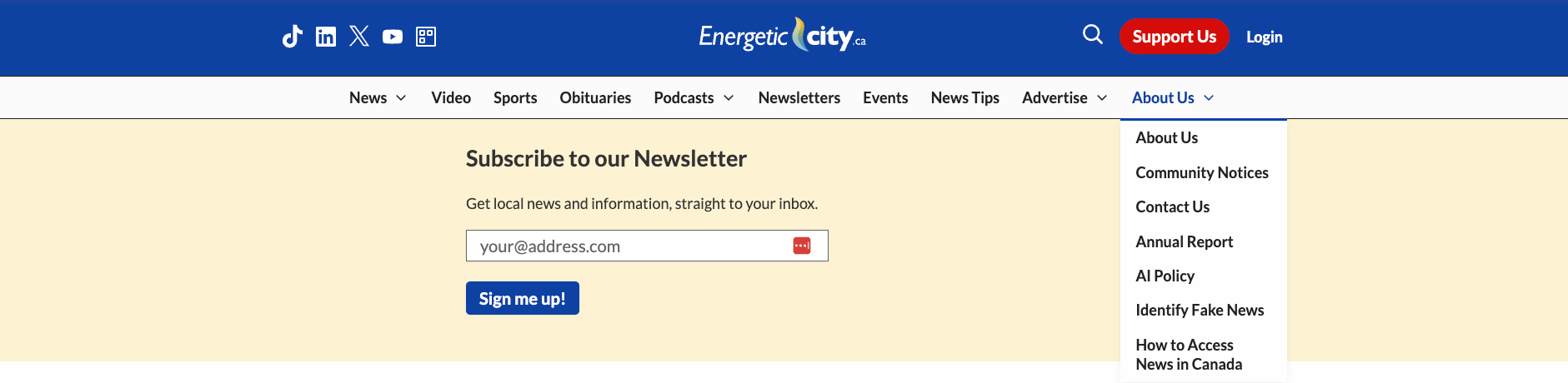
If you want to do this, you need to add a new page in the Pages section, then update the main menu where you want it to appear. For this, you’ll go to Appearance → Menus in Indie Website. Go here for step-by-step instructions about how to add a new page to your main menu.
If you’re adding in-story AI disclosures, you can add them as needed as part of the text of a story. If you’re not using AI and would like to make that reminder for your audience a persistent feature of your stories, you can use our Advance Pop-Up feature.
If your newsroom isn’t an Indiegraf publisher yet and would like to learn more, simply book a chat to speak with our team.

Indiegraf is the operating system for independent local media.