

Thank you! Your submission has been received!
Oops! Something went wrong while submitting the form.



Starting in July, Google Universal Analytics (UA) is transitioning to Google Analytics 4. Due to changes in how Google defines some metrics, legacy data from UA won’t carry over to GA4 since it can’t be 1:1 compared. Understandably, it’s a nerve-wracking change.
For network publishers using our Indie Tech bundle, GA4 has already been set up, but we understand that questions remain. Here are a few tips and tricks for getting used to the new interface.
Some metrics are now measured differently in GA4.

Bounce rate is calculated in GA4 as the inverse of engaged session rate, which uses a new 10-second timer.
You might’ve noticed a drop in traffic between UA and GA4. GA4 calculates sessions differently, using a different session timeout and taking into account cross-device and cross-platform interactions, like if someone reads your article on their phone but moves to their laptop to purchase a subscription. In addition, GA4 identifies and filters bot traffic differently, potentially resulting in lower numbers. About 30% of traffic may come from bots, so a 30% drop in traffic is reasonable.
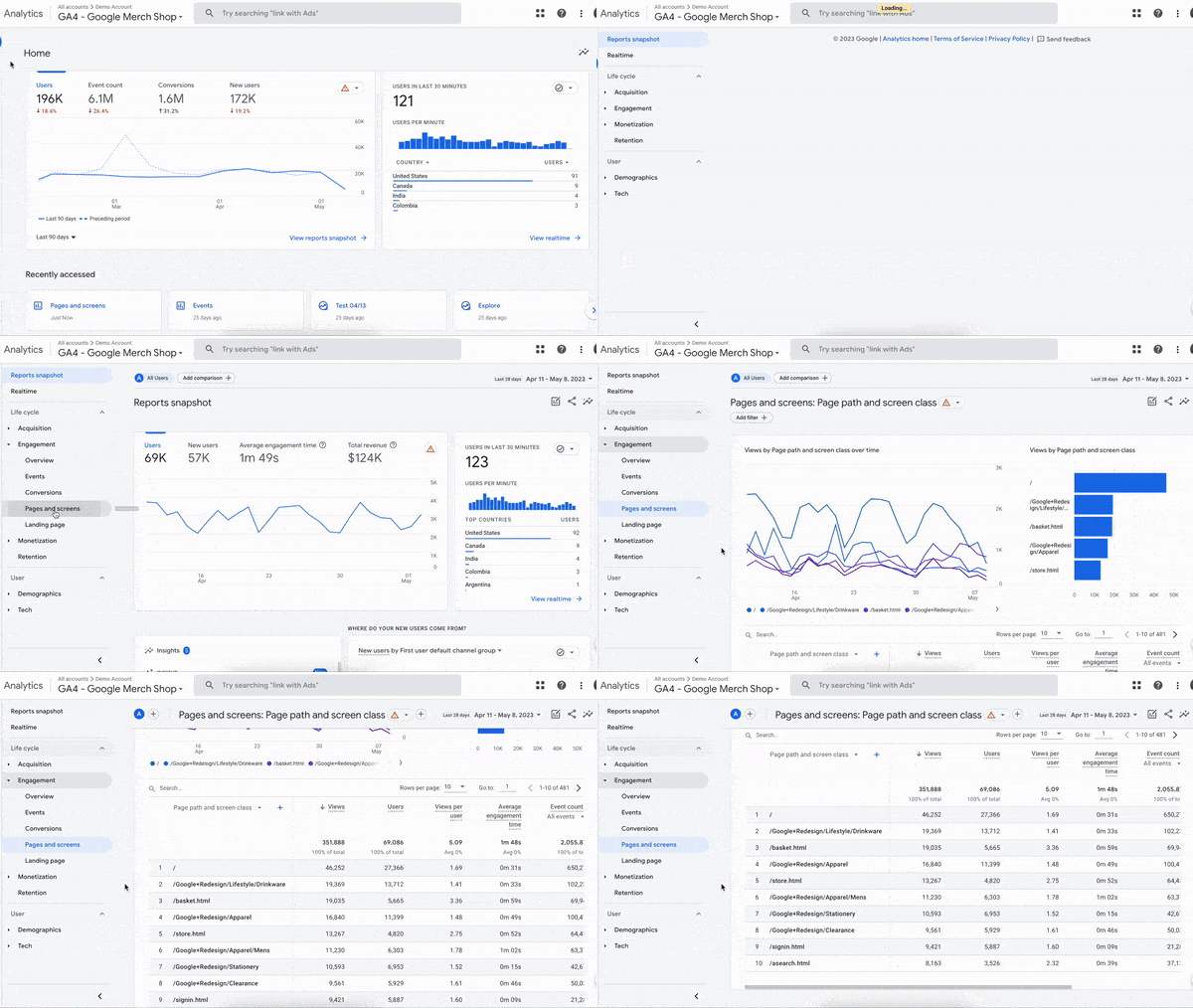
How to find the Pages and Screens tab in GA4.
The easiest place to find common metrics is the Pages and Screens tab. On the left tab, navigate to Reports → Engagement → Pages and Screens. There, you’ll be able to search for pages on your site by page title or page path (URL). Columns will display users, pageviews and average engaged time for each page. In the upper right hand corner, you can change the time frame.
Got more questions? Join Indiegraf's GA4 training for our partner publishers at 2 p.m. EST on Friday, May 12. If you are an Indiegraf network partner, get in touch with your Publisher Guide for details. If you are not currently in the network but could use the training, reply to this email and we'll send you an invite.

Indiegraf is the operating system for independent local media.